Holdfast Get it on Google Play

Keep the apps.
Lose the endless feed.

Holdfast blocks Instagram Reels, YouTube Shorts, TikTok's For You and Facebook Reels inside the apps. Your messages, your friends and the videos you go looking for stay exactly where they are.

Get it on Google Play

For Android. Free to start. Pro's yearly plan begins with a 14-day free trial for new subscribers.

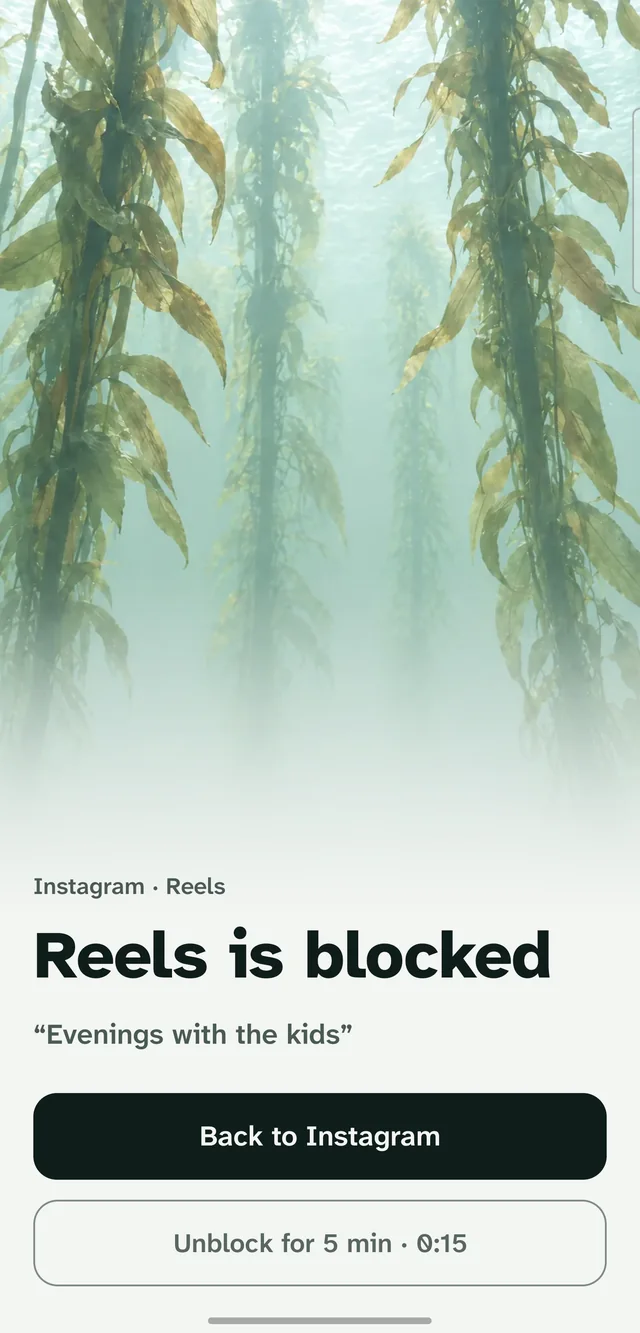
Holdfast's block screen over Instagram Reels: a calm kelp picture, the person's own reason, a Back to Instagram button and an Unblock for 5 minutes button with a short countdown.

Only the feed goes.

Blocked

  • Instagram Reels and, with Pro, the Explore grid
  • YouTube Shorts
  • TikTok For You and, with Pro, Following and LIVE
  • Facebook Reels, including reels you tap in your feed

Still works

  • Your messages and chats
  • Friends' posts, stories and profiles
  • Search, and the videos you choose to watch

Most blockers lock you out of the whole app, so you delete it, miss your friends and reinstall it a few days later. Holdfast covers the part that keeps you scrolling and leaves the rest alone. It only blocks a whole app when you ask it to, at bedtime or on a schedule.

How it works

Most of the time you reach for the feed out of habit. Holdfast gives you a moment to notice, shows you the reason you wrote for yourself, and lets you decide. Nothing is deleted, reported or shared.

  1. Turn Holdfast on

    Android asks once, in its Accessibility settings. Setup shows you exactly where to tap.

  2. Use your apps as usual

    Chats, profiles and search work the same as before.

  3. A feed opens, Holdfast steps in

    A calm block screen covers it as soon as it opens, with your reason on it.

  4. Go back, or choose to watch

    Tap Back to return to the rest of the app. If you really want to watch, unblock for 5 minutes after a short wait, and you land on the same video.

When you want it stronger

Firm mode
Two unblocks a day, each after a 60-second wait.
Lock
No unblocking at all for an hour, until morning, for a day or for a week.
Bedtime and schedules
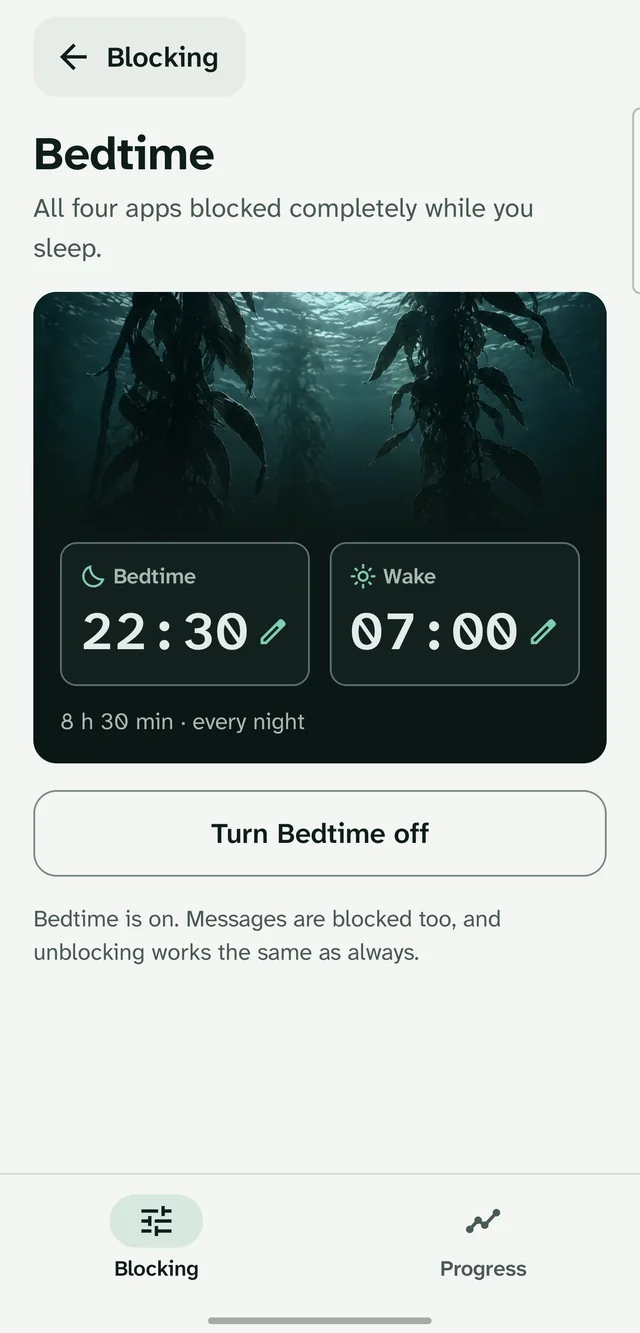
All four apps blocked completely while you sleep, or during the hours you pick for work or study.
Your weeks
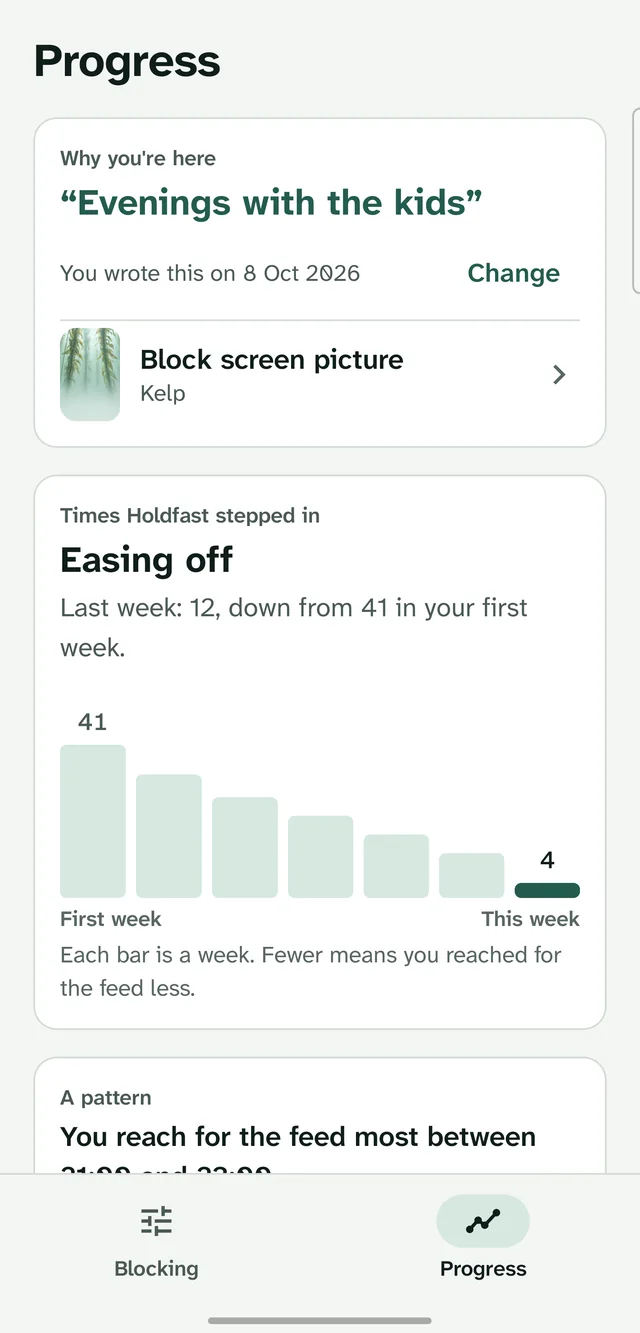
See how often Holdfast stepped in, week by week, so you can tell whether you reach for it less.

Free blocks the main feed of the one app that takes most of your time. Pro covers all four apps and every feed, and adds everything above plus your own photo on the block screen. Google Play shows the price in your currency before you subscribe, and you can cancel anytime in Google Play.

Holdfast's Bedtime page: all four apps blocked from 22:30 to 07:00 every night.
Bedtime, every night (Pro)
Holdfast's Progress page with example data: a weekly bar chart easing from 41 times in the first week to 4 this week.
Your weeks side by side (Pro, example data)

Nothing leaves your phone.

Holdfast has no permission to use the internet. Android enforces that, so it cannot send anything anywhere.

  • No account and no sign-in.
  • No ads, analytics or tracking.
  • It looks at which screen is open in Instagram, YouTube, TikTok and Facebook, never your messages, photos or what you type.
Read the privacy policy

Questions

Why does Holdfast need Accessibility?

It is the only Android permission that can tell Reels apart from your messages inside the same app. Holdfast uses it for one job: noticing when a short-video feed opens, so it can show the block screen. You turn it on yourself and can turn it off at any time in Android's settings.

Does it read my messages?

No. It looks at the layout of the screen, such as the names of tabs and whether a screen is a video feed. It never reads messages, photos, posts, passwords or anything you type. What it sees is used in the moment and is not saved or sent anywhere.

Does it work in my language?

Holdfast has been tested with the four apps set to English, Spanish, French, German, Portuguese, Turkish, Indonesian, Hindi, Japanese, Korean and Arabic.

Can I still turn it off?

Yes, always, in Android's Accessibility settings. Making blocking weaker inside Holdfast takes a little while on purpose, so one weak moment can't undo a good decision.

Is there an iPhone version?

No. iPhone apps can only block whole apps, not one feed inside them, so Holdfast is for Android.

How much does Pro cost?

Holdfast is free to start. Pro is a yearly or monthly subscription, and the yearly plan begins with a 14-day free trial for new subscribers. Google Play shows the price in your own currency before you subscribe.

Keep the apps. Lose the endless feed.

For Android phones, with Instagram, YouTube, TikTok and Facebook.

Get it on Google Play